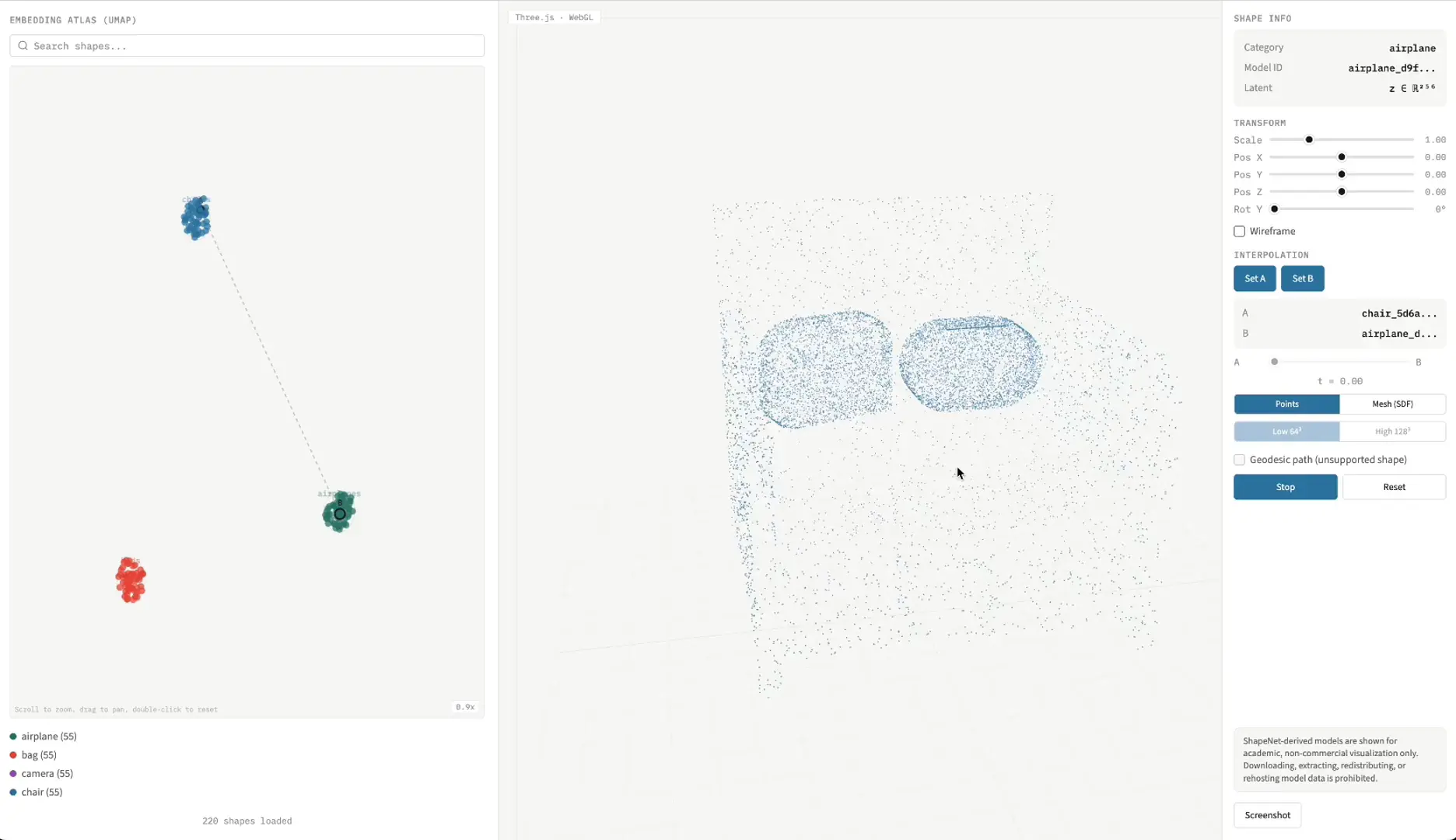
Most latent-space visualizations stop at a scatter plot. LatentSDF Explorer doesn't. Click any dot in the UMAP atlas and a chair or a plane or a lamp resolves out of a 256-dimensional code, rebuilt in your browser from a neural signed distance function. Pick two shapes, drag the t slider, and watch one melt into the other: a sofa growing armrests, a table sprouting a fourth leg, the surface reforming live off a marching-cubes pass you can crank from 64³ to 128³ when you want the geometry to stop lying to you.
Prefer to watch the model think? Flip it to point clouds. There's even a geodesic path mode, so the morph follows the curve of the learned manifold instead of bulldozing a straight line through it. Small touch, big difference in what you actually learn from the in-between shapes.
It's a coursework project, NTU's AI6131 3D Deep Learning, by Tanmay Nargas, Aditya Goel, and Sneha Balasubramoni, and it reaches past what the brief asked for. DeepSDF trains a network to answer one stubborn question, "how far am I from the surface," for every point in space; the shape lives implicitly in the weights plus a latent vector, never as an explicit mesh until you ask for one. The team trained those latent spaces on ShapeNet-derived data, then built a Three.js front end to actually walk around inside them, the clustering improvements and the interpolations both, which is the part most papers leave as a static figure and a promise.
It all runs in the browser, no download, no GPU envy required. So poke the atlas, scrub an interpolation, swap the resolution mid-morph, then open the repo to see how the SDF gets meshed on the fly. Worth a follow while you're there.
%22%3E%3Cpath%20fill-rule%3D%22evenodd%22%20d%3D%22m906.78%20339.47l-81.33-141.47-81.09%20141.46-81.11-141.46h-648.79l324.4%20565.87%20162.2-282.94%20162.2%20282.94%20162.2-282.94v-0.01l81.32-141.45z%22%2F%3E%3Cpath%20d%3D%22m515.43%20828.51c-209.17%200-378.73-169.56-378.73-378.73%200-3.11%200.16-6.19%200.23-9.28l-97.64-170.32c-24.31%2054.93-37.93%20115.66-37.93%20179.6%200%20245.35%20198.9%20444.25%20444.26%20444.25%20195.77%200%20361.85-126.69%20421.02-302.52-56.12%20138.93-192.17%20237-351.21%20237z%22%2F%3E%3Cpath%20d%3D%22m239.33%20191.68c69.09-73.59%20167.19-119.63%20276.1-119.63%20114.63%200%20217.31%2050.96%20286.74%20131.45l1.93-3.37%203.66-6.39c-80.48-113.26-212.62-187.21-362.14-187.21-148.64%200-280.12%2073.06-360.77%20185.15z%22%2F%3E%3C%2Fg%3E%3C%2Fsvg%3E)